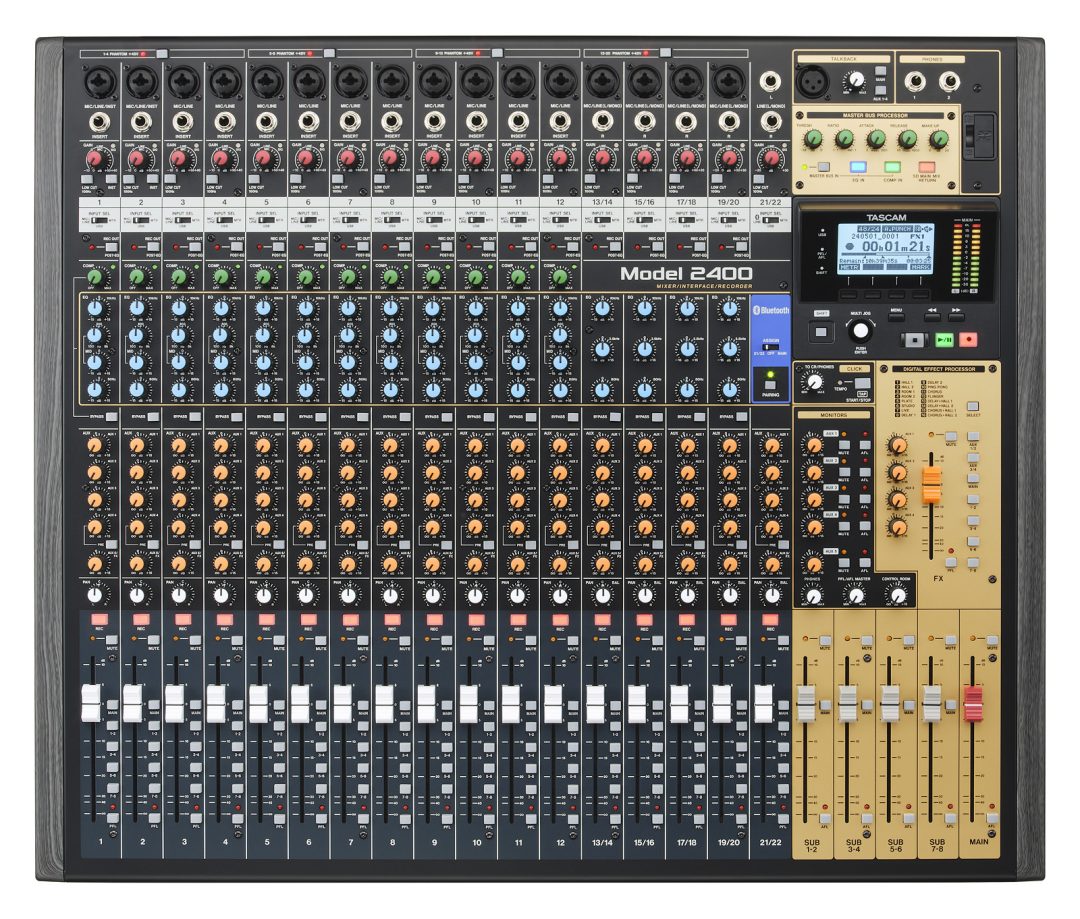
Hello, everyone! I hope you’re all doing marvelously well. Today, we’re back at Brighton Electric, and I’m excited to share a fantastic recording session we had with punk-prog band called Monakis. For those of you who have been following the channel, you might recall that about a year and a half ago, with Phil Allen at The Village Recorders, we reviewed and recorded with a Tascam all-in-one mixer/recorder unit, the Model 24. Many people appreciate this piece of equipment because it combines a console with a hard disk recorder and the ability to record directly to an SD card. It’s quite impressive!
In this session, we’ll be using the Tascam 2400 to record Monakis live, while simultaneously capturing the performance with an API 1608. This means you’ll have the opportunity to download both sets of files to compare and contrast the two recordings. We’ll also do a rough mix on both systems, so you can hear how they stack up against each other. Without further ado, let’s dive into the recording process!
Setting Up for the Session
As we arrived at Brighton Electric, I met up with Josh Harrison, known as Hoagie, a former house engineer there. The studio we were using, Studio 2, has a live room that is treated to be fairly dead, which can be beneficial in certain contexts. It allows for clean recordings without unwanted ambient noise. However, we wanted to capture a live sound, so we opened the door to the corridor and took advantage of the extra space.
One of the interesting aspects of this setup is that we’re splitting the microphone signals between the Tascam 2400 and the API 1608. This will allow you to compare the two recordings. We’ve got a total of 12 microphones set up in the live room, and we used an XLR splitter to ensure that both systems receive the same signals simultaneously.
The real challenge here was synchronising both computers. When we pressed play or record on one, we needed the other to follow suit. To achieve this, we have a MacBook connected via Ethernet to the studio’s Mac Pro. One of these computers acted as the master and send MIDI time code to the other, ensuring everything was perfectly in sync.

Tascam 2400 Specs
The Model 2400 offers exceptional versatility without compromising its powerful mixing features. Each channel includes compression, with multiple sub-groups and master stereo bus processing—complete with compression and EQ—providing you with professional-grade mix control in any situation.
22 Channels, 24 Tracks—All in One:
With its full-featured 22-channel mixing, the Model 2400 is perfect for both studio and live performances, accommodating everything from large combos and jazz ensembles to orchestras and choirs. Plus, when it’s time to record, there’s no need for an external interface or computer.
Equipped with 5 Aux sends and 4 stereo sub groups, the Model 2400 effortlessly manages complex mixing tasks. You can create additional monitor mixes without giving up an aux for effects and connect multiple sets of studio monitors to fine-tune your mixes.
Whether in the studio or on stage, the Model 2400 provides the robust connectivity and routing options you require.
Microphone Setup for the Drums
Now, let’s talk about the microphone setup for the drums. In the live room, we’ve got a kick drum mic positioned to capture that initial attack and click; we’re using a Shure Beta 52A for the kick-in mic and a Neumann U47 FET for the kick-out mic. The idea is to keep both mics in phase to avoid any timing issues.
Next, we’ve placed an SM57 on the snare, pointing directly at where Joe, our drummer, will hit. This should gave us a sharp transient sound. The toms were captured with vintage Sennheiser MD 421s, which cosmetically have seen better days but still sound fantastic! It’s important to make sure these mics are set to the correct switch, if they’re set to the speech mode, you’ll engage the High Pass Filter they’ll sound thin and lifeless. We also have a “crotch mic,” which captures the overall kit sound and acts as a glue between the various elements, some of you may remember this mic from our friend Moses Scheider as the “Wurst Mic”.
Finally, we have a pair of Austrian Audio OC818 mics positioned as overheads to capture the cymbals and overall drum sound. The goal is to create a nice balance between the kick and snare in the centre and the overheads capturing not only the cymbals, but providing overall width.
Capturing the Live Performance
With everything set up, we were ready for Monakis to come in and start playing. The excitement in the room is palpable, I had heard the band a couple of weeks before at Brighton Ekectric and loved them! The first thing we did is line check all the mics and make sure everything sounding good. As deceptively simple as the controls on the Tascam are, we were particularly impressed with the Tascam 2400’s onboard EQ and compression, which give us a lot of flexibility when recording.
As we start recording, the band jumps into their set, and the sound fills the room, their enregy is infectious! I love seeing young bands playing high energy music with GUITAR! The combination of the Tascam and API 1608 with Pro Tools captured the raw energy of the performance beautifully. Josh adjusted the levels and EQ on the fly, ensuring that each element of the recording came through clearly.
Rough Mixing and Comparison
After recording the drums, we moved on to reamping the guitars. We had captured the guitar DI signals earlier, which allowed us to send them back out through amplifiers for a more authentic sound. This method lets us keep the drums clean while still achieving that live feel.
We set up a Victory amp and a Fender Deluxe Reverb, using various microphones to capture the different tones. The idea is to blend these sounds together to create a rich, full mix that captures the essence of the band’s performance. The guitars are layered in a way that compliments the drums, and we were able to make real-time adjustments to ensure everything sits nicely in the mix.
Josh craeted a great rough mix using on board EQ and effects! We were very impressed with just how quick and easy the 2400 was to use.
Final Thoughts on the Tascam 2400
Throughout this session, I’ve been continually impressed with the Tascam 2400. It’s a versatile unit that offers a lot of bang for your buck. The ability to have faders, EQ, and compression all in one unit makes it an excellent choice for home studios or live setups. The sound quality is fantastic, and it’s been a joy to work with.
I encourage you all to download the multitracks from both the Tascam and API 1608 Pro Tools setups. Comparing the two will give you insight into how different recording methods can affect the final sound. Whether you prefer the tactile feel of the all in one Tascam or the API 1608 with external interfaces, there’s something to be learned from both approaches.
Thank you for joining us on this recording journey with Monakis at Brighton Electric. I hope you’ve enjoyed this behind-the-scenes look at the process and gained some valuable insights into live recording techniques. Until next time, have a marvellous time recording and mixing!